
XKOMODOTCOM
DONATE
  • Home
  • Blog
  • Download
    • ADB Tools
    • Ajazz Driver
    • WhatsApp APK
  • Video
  • Shop
    • Promo Starlink
      • Gratis 30 Hari Internet Starlink
  • Tools
    • Web Developer Tools
    • YouTube Shorts Link Converter
No Result
View All Result
  • Laptop
  • Smartphone
  • Mechanical Keyboard
  • Peripherals
Shopee Live YouTube Community Discord
XKOMODOTCOM
  • Home
  • Blog
  • Download
    • ADB Tools
    • Ajazz Driver
    • WhatsApp APK
  • Video
  • Shop
    • Promo Starlink
      • Gratis 30 Hari Internet Starlink
  • Tools
    • Web Developer Tools
    • YouTube Shorts Link Converter
No Result
View All Result
XKOMODOTCOM
Home Blog Posts
Driver Card for Wordpress

Card Template untuk Post di Artikel WordPress Jadi Juga Nih!

Febri by Febri
October 5, 2025
in Blog Posts, Website
0

Enak ya sekarang kalu ngoding di website, udah nggak perlu skill ngoding yang hebat-hebat banget. Aku baru bikin card template untuk di artikel dan card template ini sudah mendukung gutenberg di WordPress versi terbaru.

Awalnya aku butuh banget patterns Gutenberg atau card template ini untuk bikin tampilan tombol driver Ajazz jadi lebih menarik di artikel yang ini: https://xkomo.com/link-download-ajazz-series-driver-and-software-keyboard-mouse-peripheral

Tampilannya card template baru yang aku bikin untuk website aku seperti ini.
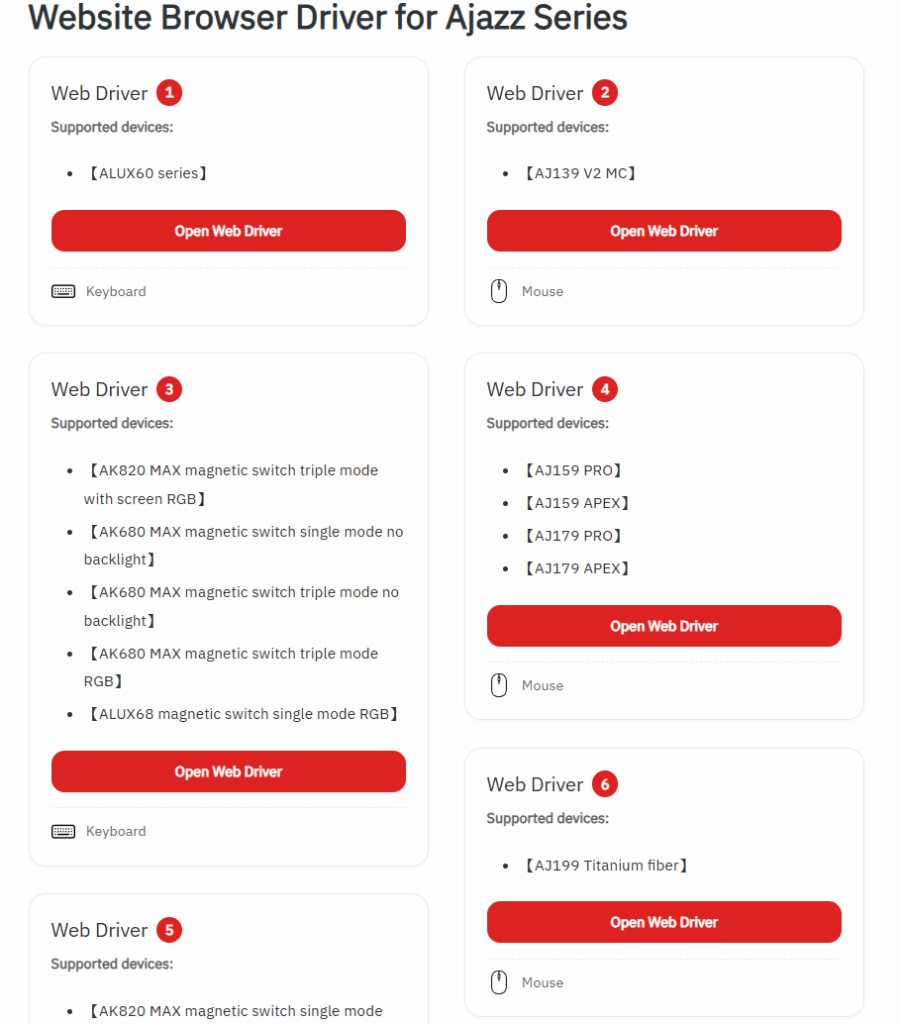
image 1

Seperti itu kalau tampilannya dia di dua kolom.

Kalau misalkan mau 2 tombol di satu kolom, nanti tampilannya bisa seperti ini.
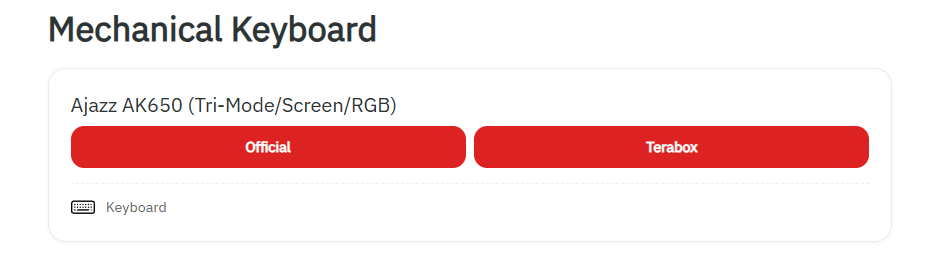
image 2

Ini card template di postingan artikel website pakai Gutenberg (WordPress), bisa customeable alias bisa kita ganti-ganti sesuka hati.

Aku kasih contoh di artikel ini ya, tampilan dari fitur patterns Gutenberg atau card template di post WordPress versi yang aku bikin.

Headline 1

Bisa diisi informasi apa pun.

  • Kalau butuh list tambahan di sini.
Link keluar
Link Keluar

Headline 2

Ini contoh kalau pakai gambar/icon.
Link keluar
Keyboard icon

Keyboard

Headline 3

Gambar/icon yang berbeda.

Link Keluar
Mouse icon

Mouse

Bagaimana menurut kamu tentang patterns Gutenbergs di WordPress ini, caranya mudah.

Aku bikinnya pakai ChatGPT5.0, dan cuma butuh ngulik sedikit aja, udah jadi kayak gini.

Terima kasih ya, ChatGPT5.

Kamu keren banget dah!

Tags: WordPress
ShareTweetSendShareShare
Previous Post

PRE-ORDER ASUS ROG XBOX Ally (2025) dan ROG XBOX Ally X (2025) – Bonus Game Senilai Rp650.000 & Lucky Draw, Total Puluhan Juta!

Next Post

Cara Mengatasi “Briefly unavailable for scheduled maintenance” di WordPress Gara-gara Update Elementor

Related Posts

Dashboard WordPress - Slow Loading
Tips

Dashboard WordPress Lemot Tapi Website Lancar? Jangan Salahin Plugin Dulu, Ini Penyebab Aslinya!

May 3, 2026
42
Rekomendasi Hosting VPS Ringan dan Kencang Harga 100 Ribuan
Blog Posts

Rekomendasi Hosting VPS Ringan dan Kencang Harga 100 Ribuan

November 24, 2025
813
Cara Mengatasi Briefly unavailable for scheduled maintenance di WordPress Gara-gara Update Elementor
Blog Posts

Cara Mengatasi “Briefly unavailable for scheduled maintenance” di WordPress Gara-gara Update Elementor

October 6, 2025
282
Blog Posts

Tampilan Sub-Menu Baru di Website Pakai Gambar SVG

October 1, 2025
18

Leave a Reply Cancel reply

Your email address will not be published. Required fields are marked *

About

XKOMODOTCOM

Sharing is caring

XKOMODOTCOM adalah tempat kamu mencari rekomendasi produk yang bagus dan sesuai kebutuhan, cari di sini dulu sebelum membeli. Supaya kamu tidak kecewa di kemudian hari!

Categories

  • Android (4)
  • Anime (1)
  • Apps (4)
  • Artificial intelligence (1)
  • Blog Posts (74)
  • ChatGPT (1)
  • Collaboration (16)
  • Computer (4)
  • Computer Peripherals (3)
  • Downloads (3)
  • Game (4)
  • Game PC (2)
  • Home Electronics (7)
  • Hosting (4)
  • Internet (11)
  • iOS (1)
  • iPhone (1)
  • Laptop (13)
  • Mobile Apps (3)
  • News (6)
  • Operating System (2)
  • Professional Services (1)
  • Review (9)
  • Smartphone (4)
  • Sponsor (15)
  • Tips (19)
  • Tutorial (14)
  • Unboxing (2)
  • Video (14)
  • Website (15)
  • Windows (2)

Products

Artificial Intelligence (1) ASUS (19) ASUS ROG Phone 8 (1) ASUS ROG XBOX Ally Series (3) ASUS TUF Gaming A14 (3) ASUS Zenbook S 14 OLED (4) ASUS Zenfone 11 Ultra (2) BARDI (6) Bstation (2) CCTV (2) ChatGPT Tips (1) Content Creator (2) DWYOR (2) Fediverse (16) Hosting (1) IndiHome (6) IP Camera (2) iPhone Things (1) IR Remote (2) Jagoan Hosting (1) Laptop Gaming (2) Mastodon (6) OBS Studio (1) PageSpeed Insights (2) PayPal (1) Promo (1) Republic of Gamers (3) ROG Phone (1) Search Engine Optimization (5) Shopee (17) Shopee Affiliate Program (25) Smart LED (2) Starlink (3) Starlink Gen 3 V4 (2) Starlink Tips (1) Threads (2) Tutorial IndiHome (5) Tutorial iPhone (1) Tutorial OBS (1) Tutorial WhatsApp (2) VPS (1) WhatsApp (3) WordPress (9) WordPress Tips (8) YouTube (2)

Recent Posts

  • ASUS ExpertBook Ultra B9406CAA, Laptop AI Premium Super Ringan dengan Performa Workstation May 9, 2026
  • Tutorial Cara Mendapatkan Gratis ChatGPT Go 3 Bulan Resmi & 100% Legal 2026 May 8, 2026
  • Cara Mendapatkan Bonus Kredit Gratis Internet Starlink (Panduan Lengkap & Mudah) May 4, 2026
  • Dashboard WordPress Lemot Tapi Website Lancar? Jangan Salahin Plugin Dulu, Ini Penyebab Aslinya! May 3, 2026
  • Review ASUS TUF Gaming A14 Ryzen AI MAX+ 392: Laptop Gaming Tipis Kencang, Sekarang Rp28 Jutaan! April 25, 2026
  • About
  • Contact
  • Disclaimer
  • Donate
  • Partnership
  • Privacy Policy
  • Sitemap
  • T&C

© 2014 - 2026 XKOMODOTCOM - Tech Enthusiast

Welcome Back!

Login to your account below

Forgotten Password?

Retrieve your password

Please enter your username or email address to reset your password.

Log In

Add New Playlist

No Result
View All Result
Shopee Live YouTube Community Discord
  • Starlink (Gratis Internet 30 Hari)
  • Home
  • Blog
  • Download
    • ADB Tools
    • Ajazz Driver
    • WhatsApp APK
  • Video
  • Store
  • Tools
    • Web Developer Tools
    • YouTube Shorts Link Converter
Buy me a coffee!

© 2014 - 2026 XKOMODOTCOM - Tech Enthusiast